Microsoft Word remains the most flexible platform for creating appointment and planning schedule templates, whether you need a simple daily booking sheet for a solo consultant, a detailed medical appointment planner for a clinic, a salon‑style client appointment scheduler, or a comprehensive business‑wide calendar template for coordinating meetings across departments. By leveraging Word’s native table engine you can produce printable daily planners, hourly appointment sheets, weekly appointment schedules, bi‑weekly or monthly calendars, and even rotating‑shift appointment matrices without ever leaving the document. Because the files are saved as plain .docx documents they open instantly on Windows, macOS, Android and Google Docs, stay macro‑free for corporate IT security, and can be exported to PDF for client‑facing handouts. Customizing each template is as easy as replacing placeholder text, inserting your company logo, applying brand colors or adding a notes column, allowing you to adapt a single master file into a tailored client‑management planner that fits any industry—from healthcare and legal services to education, sales and remote‑work environments.
Why Choose a Word‑Based Appointment Planner?
A Word‑based appointment planner opens natively on Windows, macOS, Android and iOS, and can be edited online through Google Docs or Microsoft 365, ensuring that every team member—from receptionists to field agents—can access the same file without conversion issues.
Instant Editing & Brand Personalization
Because the schedule lives inside a standard .docx document, you can replace placeholder text, insert your company logo, apply brand‑consistent colors and adjust column widths with a few clicks, creating a professional‑looking client‑management sheet that matches your corporate identity.
Macro‑Free Security
Unlike many spreadsheet‑oriented solutions, these templates contain no VBA macros, making them safe for corporate IT policies and preventing the risk of malicious code execution when the file is shared with external partners or patients.
Seamless Print‑Ready Output
Word automatically respects page‑size settings (A4 or US Letter), margins and header/footer elements, so a single click on File → Print or Export → PDF yields a clean, ready‑to‑distribute appointment schedule that looks identical on any printer or digital device.
Easy Integration with Existing Tools
The editable table can be copied into Outlook, Teams or SharePoint for calendar syncing, or exported to Excel for advanced analytics, giving you the flexibility to combine a simple appointment planner with your broader workflow management ecosystem.
Download Our Free Appointment & Planning Schedules Templates
All of our professionally designed appointment and planning schedule templates are available for immediate, no‑cost download directly from our server, so you never encounter external redirects or pop‑ups. Choose from daily booking sheets, hourly appointment grids, weekly client‑scheduler tables, bi‑weekly or monthly calendar planners, rotating‑shift appointment matrices and remote‑work planning sheets—each offered as an editable .docx file and a convenient .zip bundle for bulk use. The templates are fully printable, macro‑free, and ready for quick branding with your logo, color palette or custom fields. Click the thumbnail of the desired schedule, hit the one‑click Download button, and you’ll have a ready‑to‑use appointment planner that works in Microsoft Word, Google Docs, LibreOffice or any compatible word processor.
Core Types of Appointment & Planning Schedules
Daily 30‑Minute Appointment Planners
The daily 30‑minute appointment planner is the most compact format for professionals who need to allocate short time blocks throughout a single workday. The table is divided into half‑hour intervals beginning at the start of business hours and ending at close, with a column for client name, service description, and a notes field where practitioners can record special instructions, insurance details, or required equipment. Because the layout is built in Word, users can instantly expand or contract the number of rows to match a longer or shorter operating window, and they can color‑code each interval to differentiate between new consultations, follow‑up visits, or cancelled slots. This template is particularly useful for medical offices, legal consultants, freelance designers, and any service‑based business that relies on rapid turnover of appointments.
Hourly Appointment Sheets (One‑Hour Intervals)
An hourly appointment sheet moves the time granularity up to full hour blocks, providing a cleaner view when services typically require longer durations such as hair‑cutting, car‑maintenance, or therapy sessions. The left‑hand column lists the hour, while subsequent columns capture the client’s name, service type, practitioner, and a dedicated space for confirming contact information. The design includes a header that can hold a business logo and a footer that automatically numbers pages, making it ideal for printing multi‑page daily rosters for front‑desk staff. The template’s built‑in table style lets managers quickly apply a brand‑specific color palette, ensuring that the printed schedule reinforces corporate visual identity.
Weekly Appointment Schedules
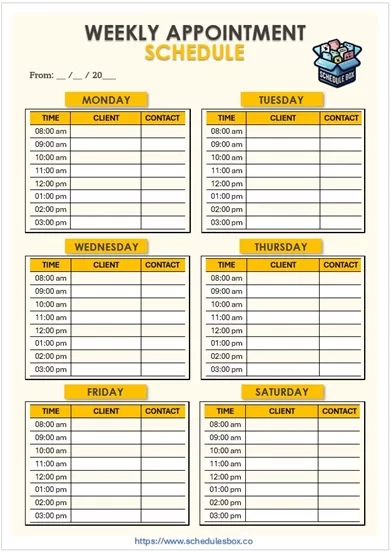
Weekly appointment schedules expand the daily grid into a full seven‑day view, allowing businesses to see the entire week’s bookings on a single page. Each day of the week occupies a column, and rows represent time slots that can be adjusted to 30‑minute or hourly increments depending on the industry. A “Shift Key” legend is positioned at the bottom to explain color codes such as green for confirmed appointments, amber for pending confirmations and red for cancellations. This format is favored by dental practices, wellness centres, and consulting firms that need to balance multiple service providers across the week while still having a quick visual reference for open slots.
Bi‑Weekly (Pay‑Period) Planners
The bi‑weekly planner merges two consecutive weekly schedules into a single spreadsheet‑style layout, making it perfect for businesses that operate on a two‑week payroll cycle. In addition to the standard client, time and service columns, this template adds fields for “Billable Hours,” “Insurance Authorization,” and “Supervisor Approval,” enabling administrative staff to capture all the data required for accurate billing and compliance. Because the document spans fourteen days, the header often includes the start and end dates of the pay period, which helps HR personnel quickly verify that all appointments fall within the correct billing window.
Monthly Appointment Calendar
A monthly appointment calendar provides a macro‑level view, displaying an entire month’s worth of slots within a classic calendar grid. Each date cell can hold multiple entries, making it suitable for practices that schedule several appointments per day, such as physiotherapy centres or corporate training departments. The template incorporates a pre‑filled holiday list that can be customized for regional holidays, ensuring that no appointments are inadvertently booked on non‑working days. Additional columns for “Room/Location” and “Equipment Required” help facilities managers allocate resources efficiently across the month.
Rotating‑Shift Appointment Matrix
The rotating‑shift appointment matrix is designed for organizations that need to rotate staff through recurring appointment blocks, such as emergency rooms, call‑centres, or field service teams. The table contains a “Shift Cycle” column that lists the rotation pattern (e.g., A‑B‑C) and a series of day‑of‑week columns where each cell indicates the assigned employee, appointment type, and any special notes such as shift hand‑over instructions. By using color‑coded cells for day, evening and night shifts, managers can instantly verify that coverage is balanced and compliant with labor‑law limits on consecutive work hours.
Project‑Planning Timeline Templates
Beyond client‑facing bookings, many professionals require a timeline that tracks internal milestones, tasks, owners, and due dates. The project‑planning timeline template adapts the appointment‑schedule concept to a Gantt‑style view within Word: the left‑hand side lists task names, responsible team members, and status, while the top row represents weeks or months. Colored bars within the table cells illustrate the planned duration of each task, allowing project managers to see at a glance where dependencies lie and which phases are on‑track. This template is especially valuable for marketing agencies, software development teams, and event‑planning firms that need to coordinate multiple deliverables alongside client appointments.
Remote‑Work / Virtual Booking Planners
With the rise of remote consultations, webinars and virtual meetings, the remote‑work booking planner adds columns for “Video‑Call Link,” “Time‑Zone,” and “Required Equipment” (e.g., webcam, headset). It also includes a “Preparation Checklist” field where hosts can note agenda items or pre‑meeting materials. The layout remains a simple table, ensuring that the same file can be printed for on‑site use or shared digitally with a hyperlink that opens a virtual meeting platform. This template serves freelancers, telehealth providers, and corporate teams that schedule internal video conferences alongside external client appointments.
By offering these eight core schedule types—daily 30‑minute planner, hourly sheet, weekly schedule, bi‑weekly pay‑period planner, monthly calendar, rotating‑shift matrix, project‑planning timeline, and remote‑work virtual booking planner—our Word‑based collection covers the full spectrum of appointment and planning needs across virtually every industry. Each template is fully editable, brand‑customisable, and ready for instant download, ensuring that users can move from a blank document to a polished, printable schedule in minutes.
