In today’s fast‑paced corporate environment a well‑structured business schedule template is the backbone of any efficient office, retail floor, call‑center or remote‑work team. Using Microsoft Word you can create printable, editable schedules that accommodate everything from daily work‑day planners and employee shift rosters to weekly project timelines and monthly staffing calendars. Because Word’s table engine allows instant color‑coding, brand‑aligned fonts and seamless insertion of logos, each template can be customized to match your company’s visual identity while remaining fully macro‑free and safe for enterprise IT policies. Whether you need a simple office schedule for a single department, a rotating shift schedule for frontline staff, a 24/7 operations roster, or a project‑task timeline that tracks milestones and owners, the downloadable .docx files on this page give you a ready‑made foundation that can be edited, saved as a reusable .dotx master template, and exported to PDF for distribution to teams, managers and clients.
Layout & Formatting Options for Word Schedules
Choosing the right page orientation sets the tone for how much information a schedule can display without sacrificing readability. A portrait layout works well for compact daily planners or single‑line shift rosters because the vertical space allows ample room for notes, employee IDs and a concise header. In contrast, a landscape orientation expands the horizontal canvas, which is essential when you need to accommodate multiple columns—such as seven work‑day headers, three shift blocks per day, or a project‑timeline that includes task descriptions, owners and due dates. Microsoft Word lets you toggle between portrait and landscape in the Layout → Orientation menu; the underlying table automatically re‑flows, preserving cell borders and shading while keeping the design intact.
Color Scheme, Branding and Conditional Formatting
Corporate branding is more than a logo; it extends to the color palette used throughout internal documents. Word’s built‑in Table Design styles enable you to apply your brand’s primary and secondary hues to header rows, shift‑key legends and status columns with a single click, ensuring visual consistency across every schedule you distribute. For teams that rely on quick visual cues, conditional formatting can be simulated by assigning distinct fill colors to specific shift codes (for example, green for morning, amber for afternoon, and red for night). Because the templates are plain .docx files, these color choices remain intact when the document is opened on macOS, Android or within Google Docs, eliminating the need for additional styling steps.
Paper Size, Margins and Print‑Ready Layout
Most businesses operate either on U.S. Letter (8.5 × 11 in) or international A4 (210 × 297 mm) stock, and the templates are pre‑configured with appropriate margins to prevent table borders from being cut off during printing. Adjusting the margins in Layout → Margins allows you to fine‑tune the printable area for double‑sided printing or for fitting a larger weekly roster onto a single sheet. When you select File → Print, Word automatically scales the table to fill the page while preserving row height, so the final PDF version mirrors the on‑screen layout without distortion.
Fonts, Typography and Accessibility
Readability on both screen and paper is maximized by using a clean sans‑serif typeface such as Calibri, Arial or Segoe UI, set at 11 pt for body text and 14 pt for headings. Increasing line spacing slightly (1.15–1.25) improves legibility for users with low vision, while high‑contrast color pairings—dark text on a light background—ensure compliance with accessibility guidelines. Header rows can be bolded and set to a larger size to create a clear hierarchy; the same style can be saved as a custom Quick Style, making it easy to replicate across multiple schedule templates.
Header, Footer and Reusable Elements
A professional schedule often includes a header that displays the company logo, the schedule title (e.g., “Weekly Shift Roster”) and the applicable date range. Placing this information in the header ensures it repeats on every printed page, while the footer can contain contact details, a confidentiality notice, or a page number. Saving the completed document as a .dotx master template preserves these static elements, allowing any team member to open the file, populate employee names and shift codes, and then save the finished schedule as a separate .docx or PDF without overwriting the original design. This approach streamlines the workflow, reduces the risk of accidental formatting changes, and guarantees that every schedule released from the organization carries the same polished, brand‑aligned appearance.
Download Our Free Business & Workplace Schedules Templates
All of our professionally designed Word schedules are available for instant, no‑cost download straight from our server, eliminating redirects or third‑party pop‑ups. Choose from daily work‑day planners, weekly employee shift rosters, bi‑weekly pay‑period calendars, monthly staffing charts, rotating‑shift matrices, 24/7 operation grids, project‑task timelines and remote‑work rosters—all delivered as editable .docx files or a convenient .zip collection for bulk download. Each template is fully printable, macro‑free and ready to be customized with your company logo, brand colors and specific shift codes. Click the thumbnail of the desired schedule, press the one‑click Download button, and you’ll have a ready‑to‑use business schedule ready for immediate implementation in Microsoft Word, Google Docs or any compatible office suite.
Core Types of Business Schedule Templates
Daily Work‑Day Planner
A daily work‑day planner is the most granular schedule a company can use, allowing managers to map every hour of a single shift on a single page. The template typically divides the day into 30‑minute or one‑hour slots, leaving columns for employee name, department, task description and a brief notes field. Because the layout is compact, it works well for office administrators who need to track meetings, client calls, and break times while still providing space for a to‑do list or priority indicator. The plain .docx format lets you insert your corporate logo at the top, color‑code high‑priority tasks, and save the file as a reusable .dotx master for daily replication across the entire team.
Weekly Employee Shift Schedules
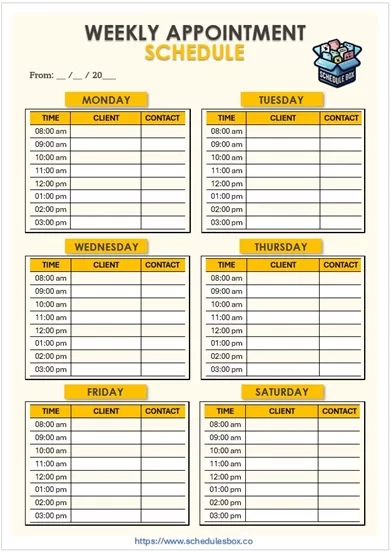
The weekly employee shift schedule expands the daily view into a seven‑day grid, ideal for retail stores, hospitality venues and manufacturing plants that operate on a fixed‑week basis. Each column represents a workday, while rows list individual staff members, their assigned shift codes (morning, afternoon, night) and any special instructions such as overtime approval or training sessions. By employing Word’s table‑design tools you can assign a distinct fill color to each shift code, creating an at‑a‑glance visual that instantly reveals coverage gaps or over‑staffed periods. The template also includes a “Shift Key” legend, making it easy for new hires or temporary workers to decode the roster without additional documentation.
Bi‑Weekly Pay‑Period Planner
Many organizations prefer a two‑week pay‑period cycle because it aligns payroll processing with employee work schedules. The bi‑weekly planner merges two successive weekly grids into a single sheet, preserving the same columns for days but extending the row count to accommodate the longer horizon. This format is especially useful for companies that need to track vacation accruals, overtime totals and statutory break requirements across the entire pay cycle. Because the template already contains fields for start‑date, department, and supervisor, HR professionals can generate a complete payroll‑ready roster with just a few clicks, then export the document to PDF for secure distribution.
Monthly Work‑Schedule Calendar
When staffing needs fluctuate seasonally or projects span multiple weeks, a monthly work‑schedule calendar provides the necessary macro view. The template arranges the month in a traditional grid, with each day offering a cell large enough for multiple shift entries, holiday markers and special events such as training workshops or inventory audits. By using Word’s built‑in date‑picker you can pre‑populate the calendar with public holidays for a given country, reducing manual entry and ensuring that no scheduled shift lands on a non‑working day. Managers can also add a “Shift Summary” row at the bottom of the table to capture total hours per employee, facilitating quick labor‑cost calculations.
Rotating‑Shift Matrix
Industries that run 24‑hour operations—such as hospitals, call centers and logistics hubs—often rely on rotating‑shift patterns to distribute night work evenly among staff. The rotating‑shift matrix template is built with seven columns for each workday and multiple rows for shift cycles (e.g., A‑B‑C rotation). Each cell contains placeholders for the employee name, shift ID and a brief description of duties, while a separate “Rotation Key” explains the sequence and duration of each cycle. Because the matrix is fully editable, supervisors can modify the rotation length, insert extra coverage for peak periods, or flag days that require a mandatory rest‑day after a night shift, thereby supporting compliance with labor‑law regulations.
24/7 Continuous‑Operation Schedules
For businesses that never close—like data‑center monitoring teams or emergency services—a 24/7 continuous‑operation schedule divides the day into three eight‑hour blocks (day, swing, graveyard) and repeats this pattern across all seven days. The template provides a row for each employee, a column for each time block, and an optional column for equipment or vehicle assignments when the role requires specific resources. By embedding conditional formatting colors—green for fully staffed, orange for partial coverage, red for gaps—managers can instantly spot under‑staffed intervals and reassign personnel before a service disruption occurs.
Project‑Task Timeline Templates
Beyond staffing, many departments need a timeline that tracks project milestones, task owners, and deliverable dates. The project‑task timeline template uses a horizontal Gantt‑like layout inside a Word table, with the leftmost columns listing task names, responsible parties, and status, while the remaining columns represent weeks or months. Each task cell can be colored to indicate completion (green), in‑progress (yellow) or delayed (red), providing a visual snapshot of project health that can be printed for stakeholder meetings or shared as a PDF with external partners.
Remote‑Work / Work‑From‑Home Roster
The rise of hybrid and fully remote workforces has created a need for schedules that capture not only shift times but also home‑office requirements such as internet bandwidth, equipment allocation, and availability windows for collaboration. The remote‑work roster template adds columns for “Home‑Office Setup”, “Core Hours”, “Time‑Zone” and “Daily Check‑In”. By using Word’s drop‑down content controls, managers can quickly select predefined options (e.g., “Standard Laptop”, “Dual Monitor”, “Flexible”) without manually typing repetitive details. This format helps HR maintain an accurate inventory of remote assets while ensuring that each employee’s work‑hour preferences are documented and respected.
Together, these core schedule types form a comprehensive toolkit that meets the diverse planning needs of any modern business—from on‑site shift coordination to project timeline tracking and remote‑work management—all within a single, fully editable Microsoft Word environment.