Seven free monthly schedule templates in Word and Excel, covering staff rosters, workout and training plans, study calendars, household chores and cleaning rotas. Each one fits a full month on a single page, and each is an editable document rather than a picture, so you can type the dates in and reuse it every month.
Free monthly schedule templates
Click any template to download it. No account, no email address, no watermark.
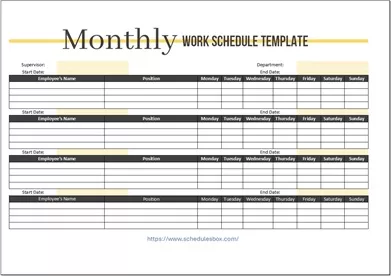
Monthly Work Schedule Template
The general-purpose month sheet in Excel. Small file, plain layout, nothing tied to a particular industry, so it adapts to whatever you need to track across four weeks.
- File type: MS Excel (ZIP)
- File size: 11 KB
- Best for: general month planning

Monthly Employee Schedule Template
Staff names down the left and the month’s dates across the top, which is the layout you need for spotting coverage gaps and planning leave a month ahead.
- File type: MS Excel (ZIP)
- File size: 68 KB
- Best for: managers and supervisors
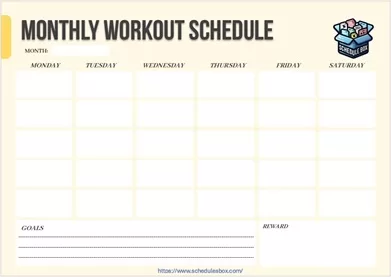
Monthly Workout Schedule Template
A month of training laid out week by week, with space to name the session and log what you actually did, so progression over four weeks stays visible.
- File type: MS Word (ZIP)
- File size: 93 KB
- Best for: gym and home training plans

Monthly Training Schedule Template
For workplace training rather than fitness. Sessions are listed with dates, trainers and attendees, so a month of courses can be planned and circulated in one sheet.
- File type: MS Excel (ZIP)
- File size: 66 KB
- Best for: HR and team leads

Monthly Study Schedule Template
Lays a term’s worth of revision across the month so assignment deadlines and exam dates sit in view together, rather than surfacing a week before they land.
- File type: MS Word (ZIP)
- File size: 87 KB
- Best for: exam and coursework planning

Monthly Household Chores Schedule Template
Chores listed down the side with space to assign each one to a person and a date, which is what stops the same two people doing everything.
- File type: MS Word (ZIP)
- File size: 86 KB
- Best for: families and shared houses
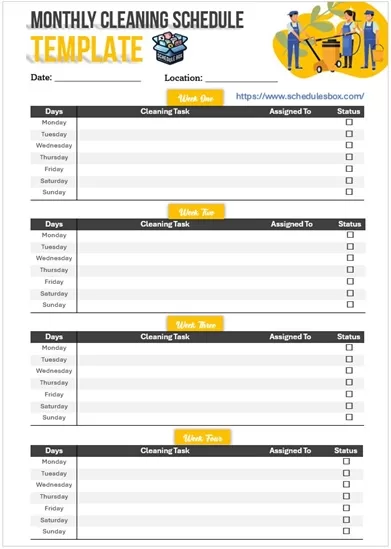
Monthly Cleaning Schedule Template
Built for the jobs that do not need doing weekly, such as windows, appliances and deep cleans, spread across the month so they are not all due at once.
- File type: MS Word (ZIP)
- File size: 1 MB
- Best for: homes, offices and rentals
Which monthly layout should you pick?
A month on one page means every day gets a small cell. That constraint decides what these templates are good for: tracking what happens on which date, not planning the detail of each day. Pick based on what you are tracking.
| If you are tracking | Use |
|---|---|
| Anything, with no fixed structure | Monthly Work Schedule Template |
| Who is working which days | Monthly Employee Schedule Template, or the full staff schedule set |
| Training sessions and attendees | Monthly Training Schedule Template |
| Workouts and progression | Monthly Workout Schedule Template |
| Deadlines, exams and revision | Monthly Study Schedule Template, or more study schedules |
| Chores shared between people | Monthly Household Chores Schedule Template |
| Deep-clean jobs on a longer cycle | Monthly Cleaning Schedule Template, or more cleaning schedules |
Most people end up using two together. The monthly sheet holds the dates that matter, and a weekly schedule template breaks the current week into something you can actually work from. If you need to plan individual days in detail, that is a daily schedule template rather than anything on this page.
How to edit a monthly schedule template
- Unzip the downloaded file, then open the document inside it in Word or Excel. Google Docs, Google Sheets, LibreOffice and Apple Pages all open these too.
- Type the month name at the top, then fill the date numbers into the cells. Check which weekday the 1st falls on before you start, because that shifts every date after it.
- Watch the month length. February needs fewer cells than March, so leave the trailing cells blank rather than deleting them if you plan to reuse the file.
- Replace the row labels down the left with your own staff names, chores or subjects. These are ordinary table cells, so retype them directly.
- In Excel, use Page Layout then Scaling set to “Fit Sheet on One Page” before printing, otherwise a wide month grid spills onto a second sheet.
- Save a blank master under a separate name. Each month, open the master, type the new dates and save as a new file, so you never overwrite the empty version.
Common questions
Are the dates already filled in for a specific month?
No, and that is deliberate. The date cells are left blank so the same file works for any month and any year. You type the numbers in once, which takes a minute and means the template never goes out of date.
Should I use a monthly or a weekly schedule?
Use a monthly schedule when you need to see dates and deadlines in relation to each other across four weeks. Use a weekly schedule when you need enough room to write what actually happens on each day. Many people print both and pin them side by side.
Can I change it to start the week on Sunday?
Yes. The day names sit in ordinary header cells, so click into each one and retype it. Remember to shift the date numbers underneath to match, or the grid will be a day out.
Why is the download a ZIP file?
The ZIP keeps the file size small. On a computer, double-click the downloaded file to extract the document inside. On a phone, you will need a file manager app that can open ZIP archives before the document will open in Word or Excel.
Can I use these templates in my business?
Yes. You can edit, print and share them within your organization at no cost. You may not resell the template files or republish them as your own download library.

Pingback: Weekly Schedule Templates — Free Word & Excel Downloads
Pingback: Cleaning Schedule Templates — Free Printable Checklists