Seven free course schedule templates in Word. “Course schedule” means two different documents depending on which side of the desk you are on, so these are split accordingly: lesson and term plans for people teaching a course, and timetables and deadline trackers for people taking one.
Free course schedule templates
Click any template to download it. No account, no email address, no watermark.
For teaching a course

Course Schedule Template – Lesson Plan
Session by session across the course, with the topic, the objective and the materials needed for each. This is the document you build once before term and work from all semester.
- File type: MS Word (ZIP)
- File size: 101 KB
- Best for: teachers and lecturers

Course Schedule Template – Weekly Plan
A week-by-week outline of the whole course rather than a single lesson, which is the level most syllabus documents and course handbooks are written at.
- File type: MS Word (ZIP)
- File size: 90 KB
- Best for: course outlines and syllabi
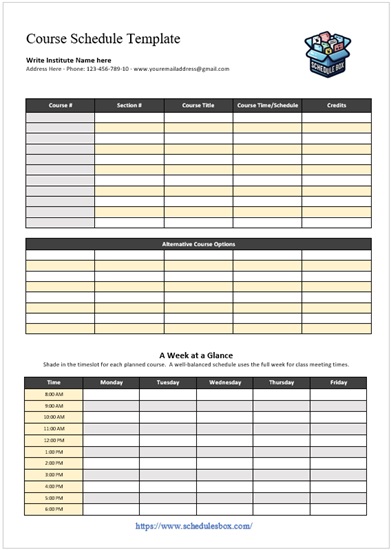
Course Schedule Template – Week at a Glance
Every class in the week on a single page, laid out as a grid rather than a list. The version to hand out or pin up, for your own teaching week or a student’s timetable.
- File type: MS Word (ZIP)
- File size: 110 KB
- Best for: printing and handing out

Course Schedule Template – Fall, Spring and Summer
Covers all three terms on one sheet, which is what you need for mapping a full academic year rather than a single semester, whether planning provision or a degree path.
- File type: MS Word (ZIP)
- File size: 94 KB
- Best for: full academic year planning
For taking a course

Course Schedule Template – Exams and Assignments
Puts every deadline and exam date for the term in one place. Filling this in during the first week is the single most useful hour a student spends on organization.
- File type: MS Word (ZIP)
- File size: 124 KB
- Best for: tracking deadlines

Course Schedule Template – Assignment Plan
Works backwards from one deadline, breaking an assignment into reading, drafting and revision with a date against each. The step between knowing a deadline and meeting it.
- File type: MS Word (ZIP)
- File size: 69 KB
- Best for: planning one piece of work

Study Schedule Template – Course-Wise
Divides study time by course rather than by day, so you can see whether one subject is quietly getting all your attention while another gets none.
- File type: MS Word (ZIP)
- File size: 69 KB
- Best for: balancing revision across subjects
Which course template should you pick?
Decide first whether you are planning what will be taught or planning how you will get through it. Those need different documents, and most of the frustration with course templates comes from downloading one when you wanted the other.
| What you need | Use |
|---|---|
| Topics and objectives for each session | Lesson Plan |
| A week-by-week course outline | Weekly Plan |
| All your classes on one printable page | Week at a Glance |
| A full academic year across three terms | Fall, Spring and Summer |
| Exam dates and coursework deadlines | Exams and Assignments |
| A plan for one specific assignment | Assignment Plan |
| Revision time split across subjects | Study Schedule – Course-Wise, or more study schedule templates |
Students generally want two: the deadline tracker for the term, and the week-at-a-glance timetable for daily use. Teachers generally want the weekly plan as the public course outline and the lesson plan as the working document behind it. For school timetables rather than university courses, an after-school schedule template or the class layout in our weekly schedule templates may fit better.
How to build a course schedule
- Unzip the file and open it in Word. Google Docs, LibreOffice Writer and Apple Pages open it too.
- Put the fixed dates in first: term start and end, reading weeks, public holidays and exam periods. Everything else has to fit around them, and they are the dates people forget until they collide with something.
- Work backwards from assessment. If an assignment is due in week nine, the material it tests has to be taught by week seven, which usually reorders the first draft of any course plan.
- Count the actual teaching weeks rather than assuming. A term is rarely the number of weeks it appears to be once holidays and assessment weeks are removed, and most overfilled courses were planned against the wrong number.
- Leave one session unallocated per term. Something will overrun, be cancelled or need revisiting, and a plan with no slack has to be rewritten the first time that happens.
- Share it as a PDF so the layout holds, and reissue the whole document when it changes rather than sending amendments.
Common questions
What is the difference between a course schedule and a lesson plan?
A course schedule maps the whole course, showing what is covered in each week and when assessments fall. A lesson plan details a single session: its objectives, activities, materials and timings. The schedule is what students see; the lesson plan is what the teacher works from.
Which template should a student download?
Start with Exams and Assignments to capture every deadline for the term in one place, then Week at a Glance for your weekly timetable. Add the Assignment Plan when a specific piece of work needs breaking down, and the course-wise study template when revision starts.
Can I use these for online or self-paced courses?
Yes, and the weekly plan suits them particularly well, because self-paced study tends to fail for lack of structure rather than lack of time. Setting your own weekly targets in advance gives an asynchronous course the shape it does not supply itself.
Why is the download a ZIP file?
The ZIP keeps the file size small. On a computer, double-click the downloaded file to extract the document inside. On a phone, you will need a file manager app that can open ZIP archives before the document will open in Word.
Can my school or university use these?
Yes. Schools, colleges and universities can edit, brand, print and distribute these to staff and students at no cost. You may not resell the template files or republish them as your own download library.

Pingback: Study Schedule Templates — Free Printable Study Plans