Six free interview schedule templates in Word for running a hiring day: who is being seen, at what time, by whom, and where. They cover in-person and online interviews, shortlists, full applicant lists and the interview agenda itself. Each is an editable Word document you can send to candidates and to your panel.
Free Interview Schedule Templates
Click any template to download it. No account, no email address, no watermark.

Job Interview Schedule Template
The general-purpose hiring roster: candidates against time slots, with the role, the interviewer and the room. Start here if you are running a straightforward interview day.
- File type: MS Word (ZIP)
- File size: 91 KB
- Best for: standard hiring days

Online Interview Schedule Template
Built for remote interviews, with room for the meeting link and the platform against each slot, so nobody spends the first five minutes hunting for a URL.
- File type: MS Word (ZIP)
- File size: 74 KB
- Best for: video and remote hiring

Interview Schedule Template for Shortlisted Candidates
For the later rounds, where there are fewer people, longer slots and usually a panel. More space per candidate than the full applicant list allows.
- File type: MS Word (ZIP)
- File size: 86 KB
- Best for: final-round and panel interviews

Interview Schedule Template for Applicants
The wide version, for a first round with a long list. Compact rows so a full day of screening interviews still fits on one readable page.
- File type: MS Word (ZIP)
- File size: 74 KB
- Best for: first-round screening
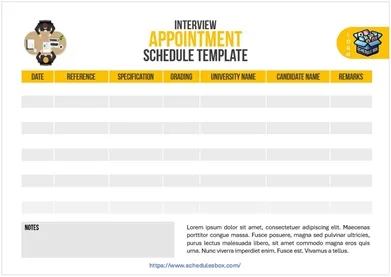
Interview Appointment Schedule Template
Formatted as a booking sheet rather than an internal roster, so it is the one to send out when candidates need written confirmation of their time and place.
- File type: MS Word (ZIP)
- File size: 234 KB
- Best for: confirming slots with candidates

Interview Agenda Schedule Template
Breaks down one interview rather than a day of them, timing the introductions, questions, candidate questions and close, so the panel stays on schedule.
- File type: MS Word (ZIP)
- File size: 93 KB
- Best for: structuring a single interview
Which interview template should you pick?
Five of these schedule a day of interviews. One schedules what happens inside a single interview. Work out which of those you need first, because they are not interchangeable.
| What you are planning | Use |
|---|---|
| A normal day of interviews | Job Interview Schedule Template |
| Interviews over video call | Online Interview Schedule Template |
| A long first-round list | Interview Schedule Template for Applicants |
| Final rounds with a panel | Interview Schedule Template for Shortlisted Candidates |
| Something to send the candidate | Interview Appointment Schedule Template |
| The running order within one interview | Interview Agenda Schedule Template |
| Interviewer availability across a week | A staff schedule template, filled in before you offer any slots |
Most hiring days need two of these together: a roster for your own side, and the appointment sheet you send to candidates. Keeping them as separate documents avoids the common accident of emailing a candidate a file containing every other applicant’s name and phone number.
How to schedule an interview day
- Unzip the file and open it in Word. Google Docs, LibreOffice Writer and Apple Pages open it too.
- Get your interviewers’ availability before you contact a single candidate. Rescheduling a panel is far harder than rescheduling one applicant.
- Leave a gap between slots. Interviews overrun, and back-to-back scheduling means every candidate after the first one waits, which is the detail they remember about your organization.
- Block a few minutes after each interview for the panel to write notes. Impressions collected at the end of the day are noticeably worse than impressions written down immediately.
- Put the room, floor or meeting link on the candidate’s copy, along with who to ask for on arrival. For video calls, state the time zone explicitly.
- Keep the internal roster and the candidate’s confirmation as two separate files, so other applicants’ details are never sent out by accident.
- Send the candidate version as a PDF so the formatting holds up on whatever device they open it on.
Common questions
How long should I allow for each interview?
It depends on the stage. First-round screening interviews commonly run 20 to 30 minutes, and final-round panel interviews 45 to 60. Whatever you choose, add a buffer between slots rather than scheduling them end to end, because a single overrun otherwise pushes the whole day back.
What should I send to the candidate, and what should I keep internal?
Send the candidate only their own slot: date, time, location or meeting link, who they will meet and who to ask for on arrival. Keep the full roster, with every applicant’s details, internal. The Interview Appointment template is formatted for the version you send out.
Can I use these for university or scholarship interviews?
Yes. The structure is the same whether you are hiring staff, selecting students or allocating places: people, times, interviewers and rooms. Change the column headings from “position applied for” to whatever fits your process.
Why is the download a ZIP file?
The ZIP keeps the file size small. On a computer, double-click the downloaded file to extract the document inside. On a phone, you will need a file manager app that can open ZIP archives before the document will open in Word.
Can I use these templates in my organization?
Yes. You can edit, print, brand and share them within your organization at no cost. You may not resell the template files or republish them as your own download library.

Pingback: Appointment Schedule Templates — Free Printable Word
Pingback: Staff Schedule Templates — Free Employee Shift Rosters