Six free staff schedule templates in Word and Excel for rostering a team. They all share the same shape, names down the left and time across the top, and differ in how much detail sits in between: shift times only, or roles, breaks and total hours. Each is an editable document, so you can type your team in once and reuse it every week.
Free staff schedule templates
Click any template to download it. No account, no email address, no watermark.
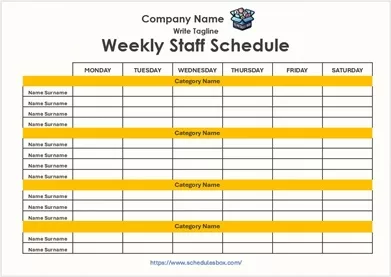
Weekly Staff Schedule Template
The standard roster: everyone’s name down the side, the week across the top, shift times written into each cell. This is the one most teams actually need.
- File type: MS Word (ZIP)
- File size: 77 KB
- Best for: weekly rostering

Daily Staff Schedule Template
One day per sheet, with room to write what each person is actually doing rather than only when they start. Suits places where the work changes from day to day.
- File type: MS Word (ZIP)
- File size: 93 KB
- Best for: daily task assignment

Staff Shift Schedule Template
Organized around named shifts rather than clock times, so you assign people to mornings, evenings and nights instead of typing hours into every cell.
- File type: MS Word (ZIP)
- File size: 70 KB
- Best for: round-the-clock operations

Department Staff Schedule Template
Groups staff under their department so coverage can be checked one section at a time, which is what you want once a single list has grown too long to read.
- File type: MS Excel (ZIP)
- File size: 68 KB
- Best for: multi-department teams
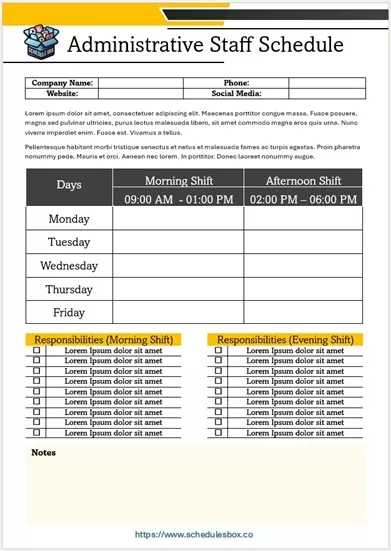
Administrative Staff Schedule Template
Built for office hours rather than shift patterns, with columns for role and duties alongside the times, so desk cover and responsibilities are visible together.
- File type: MS Word (ZIP)
- File size: 93 KB
- Best for: office and admin teams

Daycare Staff Schedule Template
Assigns staff to rooms and age groups rather than just to hours, because in childcare the question is not only who is working but who is with which children.
- File type: MS Word (ZIP)
- Best for: nurseries and childcare
Which staff template should you pick?
Start with how far ahead you publish the roster. Weekly is the default for most businesses. After that, the question is what you need in the cells besides a time.
| Your situation | Use |
|---|---|
| A normal weekly roster | Weekly Staff Schedule Template |
| Work changes day to day | Daily Staff Schedule Template |
| Named shifts covering 24 hours | Staff Shift Schedule Template |
| Several departments to coordinate | Department Staff Schedule Template |
| Office hours plus roles and duties | Administrative Staff Schedule Template |
| Staff assigned to rooms or groups | Daycare Staff Schedule Template |
| A repeating multi-week rotation | A DuPont schedule template, which is built for fixed rotating cycles |
For planning further out than a week, a monthly schedule template fits the whole month on one page, which is the right size for leave and coverage planning rather than daily detail. If you are scheduling the work rather than the people, look at production schedules or construction schedules instead.
How to build a staff schedule that holds up
- Unzip the file and open it in Word or Excel. Google Docs, Google Sheets, LibreOffice and Apple Pages all open these.
- Type your team into the left-hand column once, then save that as your master. Everything after this is filling in cells, not rebuilding the sheet.
- Fill the slots that cannot move first, such as opening, closing and anyone with fixed availability. Work outward from those rather than starting at Monday and hoping it balances.
- Add a total hours column at the right edge if the template does not have one. It is the quickest way to catch someone drifting toward overtime before payroll does.
- Note breaks in the cell rather than in your head. A roster that looks fully covered but has three people on lunch at once is the most common way these go wrong.
- Check it against your local rules on rest periods and maximum hours before publishing it. Requirements differ by country and sometimes by state or industry.
- Print or circulate it as a PDF so nobody can edit their own shift. File then Save As, then PDF, in both Word and Excel.
Common questions
What is the difference between a staff schedule and an employee schedule?
Nothing. The two names describe the same document, a roster showing who works when. You may also see it called a shift schedule, a work rota or a duty roster depending on the country and industry.
How do I handle a rotating shift pattern?
For a simple two or three week rotation, fill one cycle into the weekly template, save it, and copy it forward. For a fixed cycle that repeats across crews, such as four crews covering 24 hours continuously, a DuPont schedule template is designed for exactly that pattern and will save you working it out by hand.
Should I use the Word or the Excel version?
Use Word if you print the roster and pin it up. Use Excel if you want totals, because it can add up each person’s hours automatically and flag anyone over their contracted amount. Excel is also easier to reuse week to week, since you can copy a sheet and edit the dates.
How far in advance should I publish the roster?
That depends on your sector and on local law, and some jurisdictions set a minimum notice period for shift workers. As a practical matter, most teams find a week or two ahead works: far enough for people to plan, close enough that it does not need constant revision.
Can I use these templates in my business?
Yes. You can edit, print, brand and share them within your organization at no cost. You may not resell the template files or republish them as your own download library.

Pingback: Weekly Schedule Templates — Free Word & Excel Downloads
Pingback: Daily Schedule Templates — Free Word & Excel Downloads
Pingback: Monthly Schedule Templates — Free Word & Excel Downloads
Pingback: Hourly Schedule Templates — Free Printable Word Files
Pingback: Volunteer Schedule Templates — Free Printable Word
Pingback: Interview Schedule Templates — Free Printable Word
Pingback: Production Schedule Templates — Free Word & Excel Files
Pingback: DuPont Schedule Templates — Free 28-Day Rotation Grid